
Stop proving it wasn’t the firewall.
One question. Every enforcement plane between two endpoints. FireWeave returns the verdict, the exact rule that made it, and the evidence behind it — across Palo Alto, Check Point, Fortinet, Cisco, AWS, Azure and GCP. And when the policy says allow but the traffic still fails, it goes to the packet.
20 minutes · No prep required · See it on real infrastructure
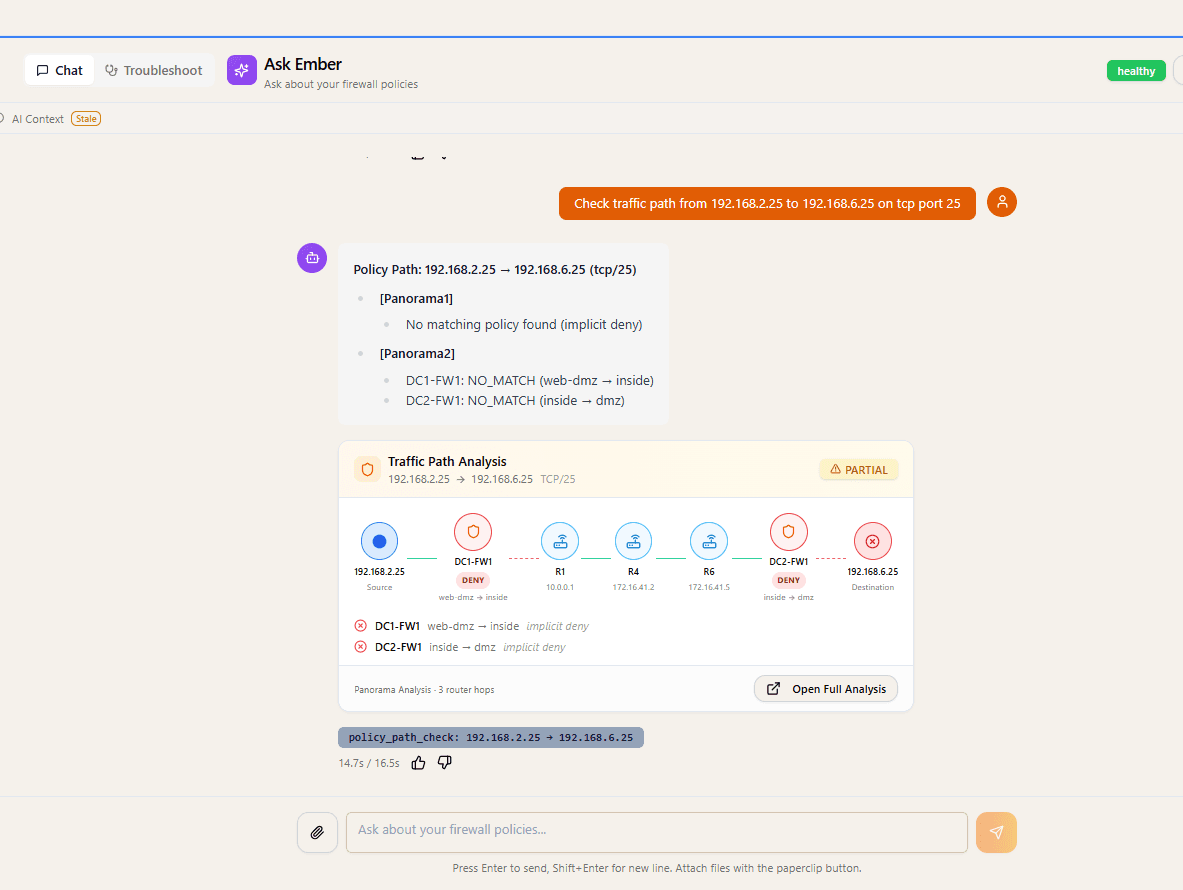
AI Assistant
Ask in Plain English
✓ Traffic is ALLOWED
Matches rule "allow-web-traffic" in Device Group: Production
Query policies, check paths, and get instant answers—no manual lookups required.
Multi-Vendor
Unified Visibility
Deploys policy to six enforcement planes. Reads and analyses seven more.
Security Intel
Attack Path Analysis
Kill chains and blast radius across AWS, Azure and GCP — before attackers find them
3 attack paths detected → View analysis
Live Analysis Dashboard
✓ Deterministic, repeatable analysis
ServiceNow → Panorama
⚡ End-to-end: Ticket → Deploy → Evidence → Close
Your firewall estate grew faster than any human can trace.
Thousands of rules across Panorama, multiple clouds, and a dozen device types. Every change request means hand-tracing paths, second-guessing blast radius, and hoping you didn't just open a hole. The one engineer who actually understands the rule base becomes the bottleneck for the entire org.
Hours lost hand-tracing ACLs
Answering “can host A reach host B?” means grepping through thousands of rules across Panorama, multiple clouds, and a dozen device types.
Change windows that stall
No one is certain what a rule will break, so requests pile up while engineers second-guess blast radius.
Audit prep as a fire drill
Screenshotting configs and rebuilding evidence by hand turns every framework review into a week-long scramble.
Most of an outage is spent finding the cause.
Not fixing it. The fix is usually a two-minute change; the hours go to six people on a bridge call, each proving it isn’t their layer. FireWeave sends an agent down the actual path, gathers the evidence hop by hop, and comes back with the cause and the proof — while you keep your hand on every command it runs.
Investigation log
10.4.9.20 → 172.16.31.10 : 443- Path resolved
6 hops · Palo Alto → Cisco → ACI → AWS
- Auto-diagnosis
Read-only checks run in parallel on every managed hop
- Command proposedAwaiting approval
show interface ethernet1/3 — checking L1 before policy
- Approved by you
Executed via the Panorama API · 142 ms
- Root cause
Output drops on ethernet1/3 — duplex mismatch, not policy
Not verified
Return path from 172.16.31.10 was not tested. Recommended before closing.
Illustrative session. Hops, commands and verdicts come from your own environment.
It works the hops, not the ticket
The agent resolves the real path between two endpoints, then investigates each hop bottom-up — interfaces and errors before policy, because a timeout is rarely the firewall.
It cannot act without you
Every command is proposed with its reasoning and waits for approval. In autonomous mode it is restricted to read-only checks, freeform CLI is refused outright, and a server-side budget halts the run.
It tells you what it didn't check
Findings are split into proved, assumed and not-tested. Confidence is a published formula with hard caps — a slowness symptom can never be blamed on policy at high confidence.
It hands you the evidence
Every command, the raw device output, who approved it and when — exported to PDF. The artefact your auditor wants and your bridge call never produces.
See it in action
The whole product in 2:59
A recorded walkthrough of the real interface — live topology, a hop-by-hop path verdict with the rule and evidence behind it, policy-debt cleanup, and agents that pause for approval before anything is deployed. No signup, no form.
Jump to a chapter
One Platform for Every Firewall and Every Cloud
One view across your firewalls, fabrics and clouds — and one honest answer about what we do with each. FireWeave writes and rolls back policy on Palo Alto Panorama, Check Point, Fortinet, AWS, Azure and GCP. Everywhere else it reads, analyses and verifies, so a path verdict still accounts for the hops we don’t control.
Firewall Platforms
Palo Alto Panorama
- Device Groups
- Templates
- Security Policies
- NAT Rules
- VPN Config
Check Point
- Management Server / MDS
- Gateway Inventory
- NAT Simulator
- VPN Audit
- Governed Deploy
Fortinet
- FortiGate Collection
- Policy Analysis
- Rule Optimizer
- NAT Explorer
- Deploy & Rollback
Cisco FMC
- Device Inventory
- Policy Explorer
- NAT Explorer
- Shadowed & Unused Rules
- Audit Log
Cloud Platforms
AWS
- VPCs & Subnets
- Security Groups
- Transit Gateway
- EC2 & RDS
- Direct Connect
Azure
- Virtual Networks
- Network Security Groups
- Application Security Groups
- ExpressRoute
- VPN Gateway
GCP
- VPC Networks
- Firewall Rules
- Cloud Assets
- VM Instances
- VPN Tunnels
Azure Firewall
- Firewall Policies
- Rule Collections
- Path Testing
- Native Azure Context
Unified Network Topology
Real-time view across all connected platforms
Attack Path Analysis
3 critical paths detected
Attacker
Web Server
App Server
API Gateway
Database
Target
Path Risk Score: 9.2 / 10
4 hops • 3 firewall traversals
3
Attack Paths
12
Exposed Assets
5
Critical Findings
See Attack Paths Before Hackers Do
Don't wait for a breach to discover your vulnerabilities. FireWeave analyzes your entire infrastructure—across clouds and on-prem—to identify attack paths, calculate blast radius, and prioritize remediation.
Kill Chain Analysis
Visualize complete attack paths from initial access to data exfiltration across your infrastructure.
Blast Radius Calculation
Understand the impact of potential breaches before they happen. See what an attacker could reach.
Internet Exposure Detection
Automatically identify services exposed to the internet and assess their risk level.
Toxic Combination Alerts
Detect dangerous combinations of permissions and access that create security vulnerabilities.
AI you can actually deploy.
Most AI security tools summarize and suggest — then leave the risky part to you, because their output can't be trusted in production. FireWeave is different. The AI understands your intent in plain English, but every path, every rule, and every change is computed deterministically against your real configuration.
Legacy NSPM with bolted-on AI
Suggest, then hand back
- Summarizes and suggests — leaves verification to you
- Same question can return a different answer
- Risk lives in the gap between “AI says” and “you deploy”
Deterministic by design
Ask, compute, deploy
- Plain-English input, deterministic computation against your real config
- Same input, same answer, every time
- Every path, rule, and change is provable and audit-ready
The difference between AI that hands you talking points and AI that hands you a deployed, defensible change.
Your AI can read your network. It still can’t change it.
FireWeave runs an MCP server, so Claude Code, Claude Desktop or your own agents can ask real questions about your firewall estate — which rule matches this flow, what is shadowed, where does this path break. Answers come from the same deterministic engines the product uses. The model narrates; it never decides.
Connect a client
claude mcp add \
  --transport http fireweave \
  https://fireweave.internal:8200/mcp \
  --header "Authorization: Bearer ***"
Issue a scoped token from the admin console and paste it into any MCP client. Revoke it from the same screen.
Works with
Read-only by default
The MCP surface ships disabled. Turning it on exposes read tools only. The two write tools draft an access request for a human to approve — they deploy nothing.
Every call audited
One audit row per tool call: which service account, which client, which tool, hashed input and output, and how long it took. Hashes, not payloads.
Your permissions, not the model's
Each client gets a scoped service-account token you can revoke. Your existing RBAC is re-enforced on every single call — there is no second enforcement path.
Your model, your network
Point it at a hosted model, or run entirely against a local one so no configuration leaves your perimeter. Cross-provider failover is built in.
Bring your own AI. FireWeave is the approval gate.
A closer look
Inside the interface
The same screens from the tour, if you would rather scan than watch.
See FireWeave on your own firewall estate.
Book a 20-minute demo and watch FireWeave answer a real question about your network, trace a live path, and run a change end to end. No slideware — your environment, your rules.
20 minutes · No prep required · See it on real infrastructure